
Projects, Surfaces, and Portfolios
תוכן זה אינו זמין עדיין בשפה שלך.
Agent Analytics uses one hierarchy for product-system understanding:
Portfolio → Projects → Surfaces
Start with this model before you choose an install path, create extra projects, or ask an agent to read analytics across a company account.
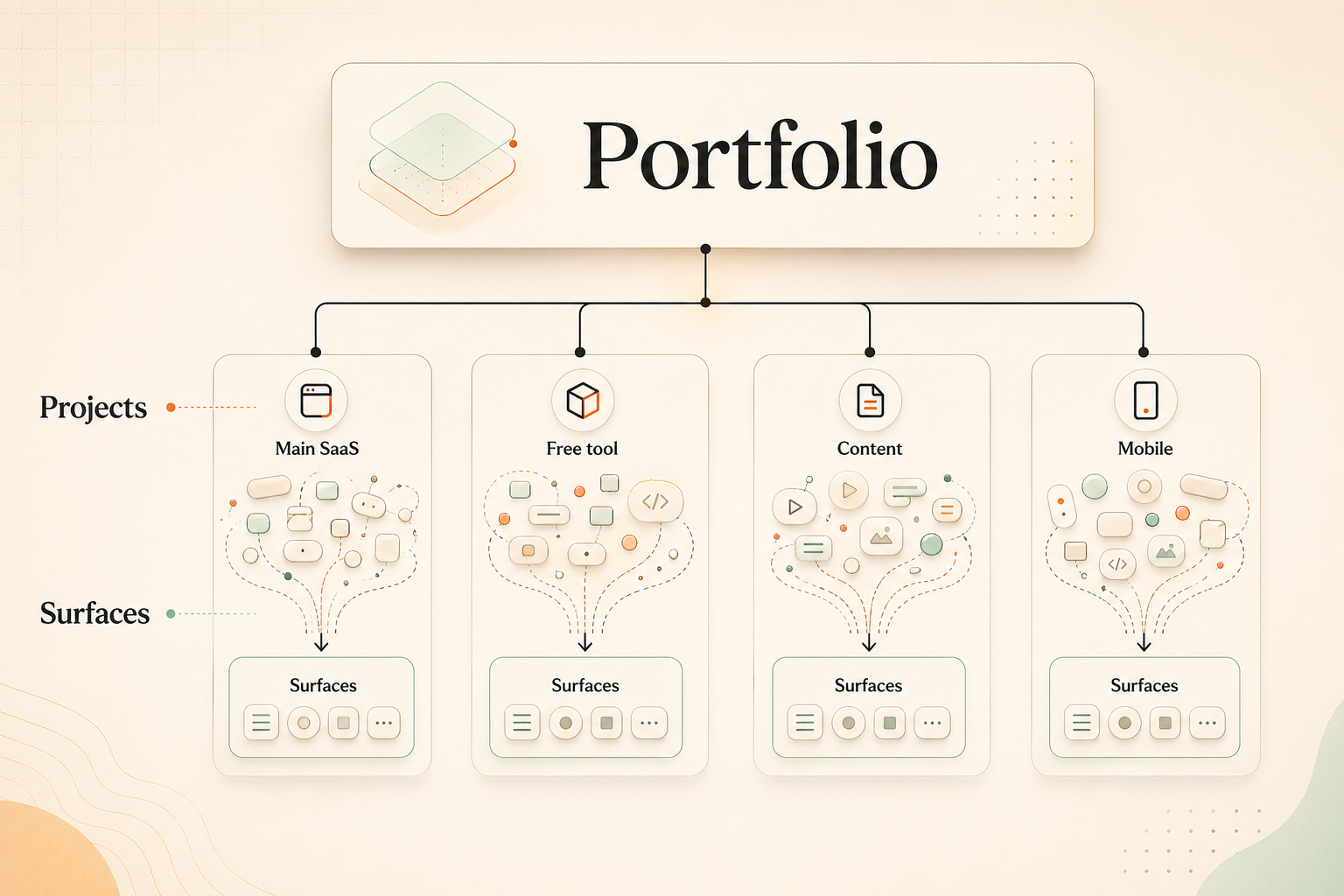
The model
Section titled “The model”Portfolio
Section titled “Portfolio”A portfolio is the broader product or company growth system. It connects related projects so your agent can reason about shared milestones, project roles, surface roles, shared goals, and cross-project identity when configured within intentionally grouped portfolio projects.
A portfolio does not collapse everything into one analytics blob. Each project still keeps its own local truth: activation, retention, lifecycle, releases, experiments, and goals remain project-local; portfolio-level questions compare or relate that local truth instead of replacing it.
Project
Section titled “Project”A project is the unit of product learning. It owns the events, activation goal, retention behavior, lifecycle, releases, experiments, and local readouts for one product or product loop.
Create a separate project when something has its own learning loop or needs its own activation, retention, lifecycle, release, experiment, or local-goal readout.
Surface
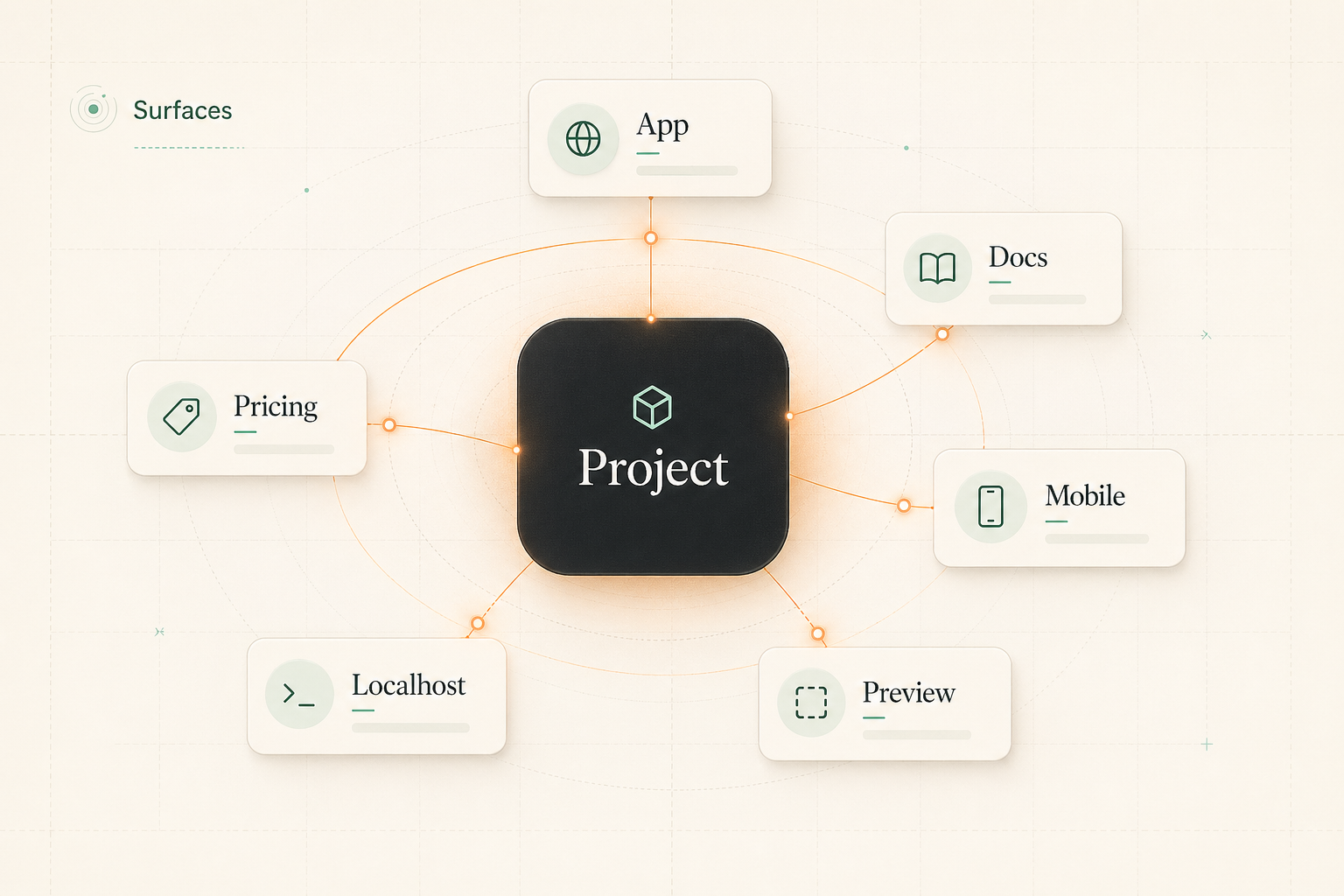
Section titled “Surface”A surface is a place where users encounter or use a project. Surfaces live inside projects.
A project can have many surfaces, such as:
- app pages
- marketing pages
- docs
- blog or content pages
- pricing pages
- signup and onboarding flows
- local preview URLs
- preview deployments
- mobile clients
- launch pages
- subdomains
Do not create a separate project just because a product has multiple surfaces. Keep surfaces together when they serve the same product learning loop.
Domain, subdomain, and URL
Section titled “Domain, subdomain, and URL”A domain, subdomain, localhost address, preview deployment, or URL is an address for a surface. It is not the product model by itself.
For example, app.example.com, docs.example.com, www.example.com/pricing, a mobile deep link, and localhost:3000 can all point at surfaces. The question is not “which domain is this?” The question is “which project does this surface belong to?”
Generic SaaS portfolio example
Section titled “Generic SaaS portfolio example”Imagine one company with a SaaS product and three related growth properties. In Agent Analytics, that can be modeled as one portfolio with several projects inside it:
| Portfolio | Project | Example surfaces | Why it is a project |
|---|---|---|---|
| ExampleCo growth portfolio | Main SaaS | App, marketing site, docs, pricing, onboarding, local preview | It owns the core product activation, retention, releases, and experiments. |
| ExampleCo growth portfolio | Free ROI calculator | Calculator page, results page, lead capture, embed, preview URL | It has its own acquisition loop, completion goal, lead handoff, and experiment readout. |
| ExampleCo growth portfolio | Newsletter/content site | Articles, archive, signup page, referral page, product handoff pages | It has its own content growth loop and local goals. Native email-service-provider opens/clicks are not assumed unless you explicitly send those events. |
| ExampleCo growth portfolio | Mobile companion | iOS app, Android app, app landing page, deep links, beta preview | It may have its own lifecycle, release cadence, retention behavior, and product readout. |
The portfolio connects these projects because they are part of one product-system story. The projects remain separate because each has its own learning loop.
Default: subdomains are usually surfaces
Section titled “Default: subdomains are usually surfaces”Do not split a product into separate projects just because it uses multiple subdomains. Subdomains are deployment and routing details first. They should remain surfaces inside one project by default when they support the same product learning loop.
For example, keep these as surfaces of the same Main SaaS project when they share the SaaS activation, retention, lifecycle, releases, experiments, and readout:
app.example.comfor the product appdocs.example.comfor product education and activation supportblog.example.comfor content that feeds the same product funnelwww.example.comormarketing.example.comfor marketing, pricing, signup, and onboarding
The question is not “does this have its own subdomain?” The question is “does this need its own product-learning container?”
When something is a surface instead of a project
Section titled “When something is a surface instead of a project”Keep something as a surface inside an existing project when it serves the same product learning loop and should be read with that project’s local truth.
Common examples:
- App, docs, blog, marketing, pricing, signup, and onboarding subdomains that all support the same SaaS activation and conversion loop.
- A small calculator, checklist, or feature page on the main marketing site that feeds the same signup funnel and does not need its own local readout.
- A mobile app that is simply another client for the same product, with the same activation and retention definitions as the web app.
- A newsletter signup page, article archive, referral page, or product handoff surface that is part of the same product funnel.
- A localhost URL or preview deployment used only to set up, test, or QA tracking for the intended project.
Surfaces can be permanent, temporary, public, private, web, mobile, or local. They still live inside projects.
When a surface should become a separate project
Section titled “When a surface should become a separate project”Create a separate project when the work needs its own product-learning container.
Good signals include:
- a distinct activation goal
- a distinct retention pattern
- its own lifecycle
- its own release cadence
- separate experiments or readouts
- a local goal that should not be averaged into the main product
- a separate acquisition loop, such as a free tool or newsletter/content site
- a mobile companion that behaves like a product, not just a client surface
If one or more of those signals materially changes how the team should read the product, promote the surface to its own project and connect it to related projects through a portfolio when the broader product system should be understood together.
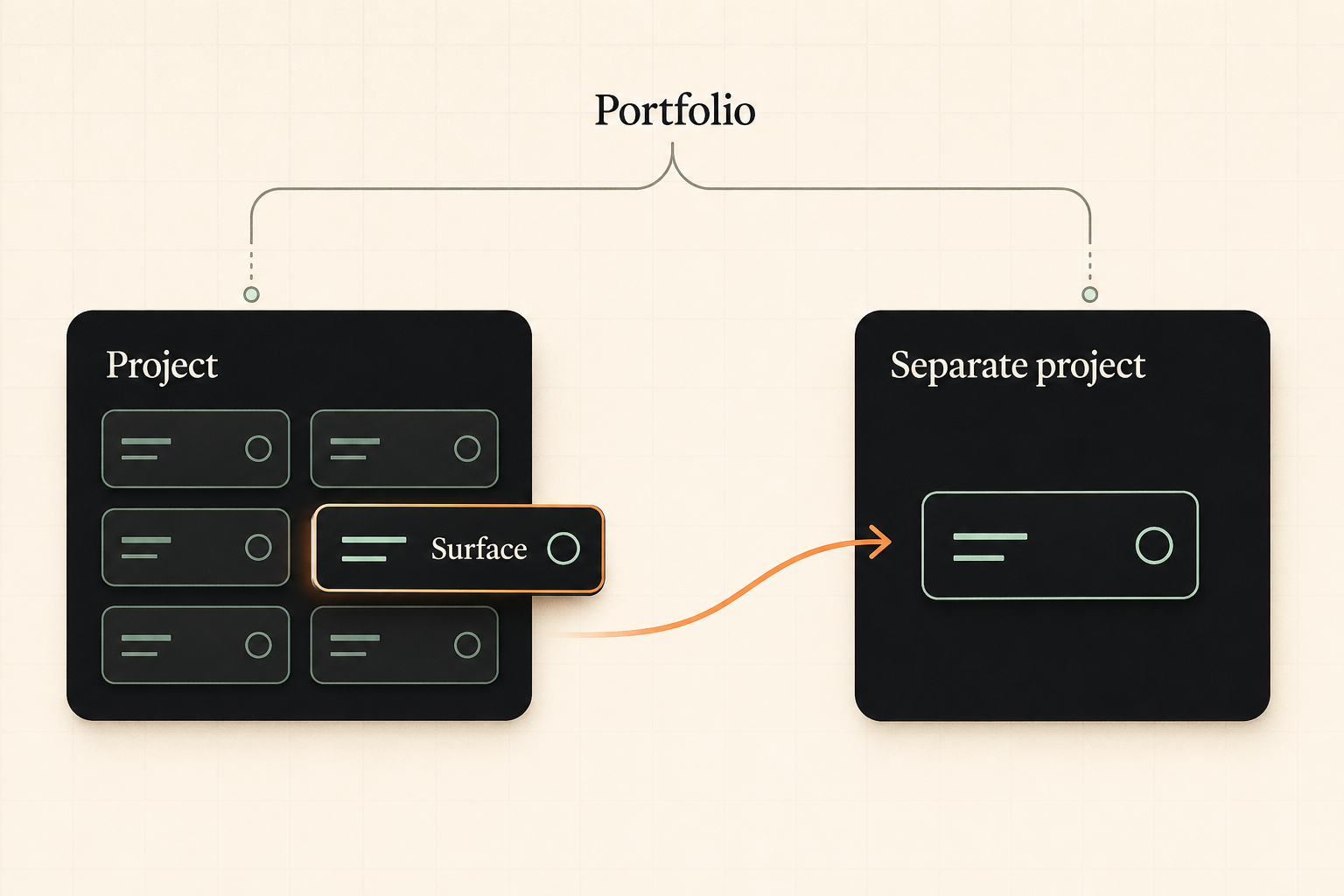
Edge-case classification examples
Section titled “Edge-case classification examples”Mobile app: surface or project
Section titled “Mobile app: surface or project”Treat a mobile app as a surface when it is another way to use the same product and shares the same activation, retention, lifecycle, and product readout as the web app. For example, an iOS client and Android client can be surfaces of the Main SaaS project when they are client entry points for the same account workflow.
Treat a mobile app as its own project when it has its own activation, retention behavior, lifecycle, release cadence, experiments, or local goals. A mobile companion with app-specific onboarding, push-notification retention, beta cohorts, store releases, and mobile-specific readouts should usually be its own project inside the portfolio.
Free tool: surface or project
Section titled “Free tool: surface or project”Treat a free tool as a surface when it is a small part of the main product funnel. A calculator section on a pricing page can stay inside the Main SaaS project when the only goal is to help users continue to signup.
Treat a free tool as its own project when the team needs to measure the tool as a product loop: tool starts, completions, result views, lead captures, embeds, referrals, handoffs to the paid product, and tool-specific experiments. In that case, connect the Free Tool project to the Main SaaS project through a portfolio instead of merging their local goals.
Newsletter/content site: surface or project
Section titled “Newsletter/content site: surface or project”Treat newsletter/content pages as surfaces when they support the same product loop: a newsletter signup page, article archive, referral page, or product handoff surface can live inside the Main SaaS project when the readout is the main product funnel.
Treat a newsletter/content site as its own project when it has its own content growth loop, acquisition goals, referral mechanics, publication cadence, experiments, or local readout. Track the web and event surfaces you instrument, such as signup pages, archive pages, referral pages, and product handoff pages. Agent Analytics does not automatically track native email-service-provider opens or clicks unless you explicitly send those events.
Localhost and preview deployments
Section titled “Localhost and preview deployments”Treat localhost, local network addresses, branch previews, staging links, and deploy-preview URLs as setup or testing surfaces. They help you install, verify, and QA tracking for the intended project, but they are not canonical project identities.
Do not create a new canonical project for every preview URL. If a preview URL is ambiguous, ask which project and surface it is testing, then map the setup work back to that project.
How portfolios should be used
Section titled “How portfolios should be used”Use a portfolio when related projects need to be understood together without losing project-local truth.
In the CLI/API reference, identity portfolios define the membership and lookup boundary, and portfolio context stores interpretation notes. This guide uses portfolio as the product-system model those features support.
A portfolio can help your agent answer questions like:
- Which project is driving the best handoff into the main SaaS product?
- Did a shared launch milestone affect multiple projects?
- Which surface roles belong to acquisition, activation, education, or retention?
- How do intentionally grouped projects relate when cross-project identity is configured?
Portfolio-level reasoning should stay intentional. Agent Analytics should not imply that identity automatically merges across every project in an account. Cross-project identity is a portfolio capability only when configured and only within the projects you intentionally group together.
Quick classification checklist
Section titled “Quick classification checklist”Before setup or analytics reads, the user or agent should classify the target in this order:
- Name the broader system. Is this one product, or a company growth system with related projects that should be connected by a portfolio?
- Find the project-local learning loop. Which product owns the activation, retention, lifecycle, releases, experiments, and local goals?
- Check whether the target is only a surface. Is it an app, docs, blog, marketing page, mobile client, free-tool page, newsletter signup page, archive, referral page, product handoff surface, localhost URL, preview deployment, or subdomain that supports that same project?
- Promote only when needed. Does it have its own activation, retention, lifecycle, release cadence, local goal, acquisition loop, experiment plan, or readout? If yes, make it a separate project.
- Connect related projects intentionally. If separate projects belong to one company or product-system story, put them in a portfolio. Do not use the portfolio to overwrite each project’s local truth.
- Handle identity carefully. Cross-project identity is available only within intentionally grouped portfolio projects when configured. Do not assume automatic identity merging across every project in an account.
- Map URLs last. Which domain, subdomain, path, mobile deep link, local address, or deployment URL currently points to the surface?
If a URL is ambiguous, ask which project and surface it belongs to. Do not treat the raw domain as the project identity, and do not fail just because a URL is local, temporary, or different from the primary setup URL.